Written at 30,000 Feet
Somewhere over the Rockies, I wrote a song on an iPad inside a platform I built in three months - and by nightfall my brothers and I were singing it around a campfire. Here's a tour of the room where it happened.
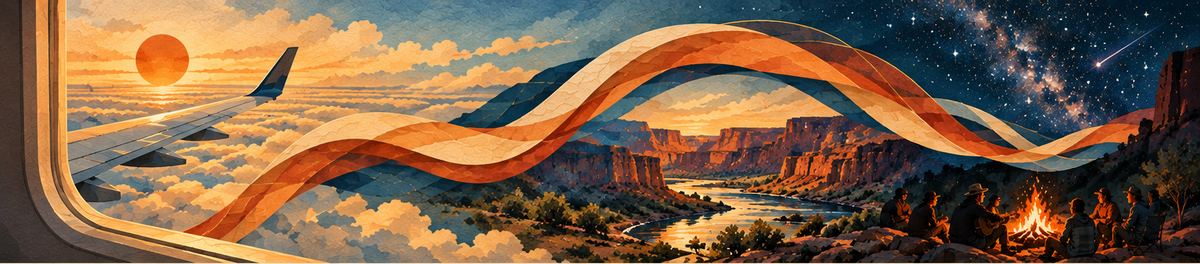
It’s early September, and I’m on an iPad 30,000 feet in the air. I’m finger typing (awkwardly) into a software platform I’ve built - the KNote Operating System, or KOS for short. There are four hours before landing in Utah for a weekend of camping and rafting with family and friends, and I am writing a song for the occasion, on a device I hadn’t tried the KOS on before.
If you’ve followed this series, you’ll know that while driving home from New Orleans I started talking with Claude AI, asking it to thoroughly grill me on my personal interests in technology, music and meditation. It captured the creative tools I use on a daily basis, and pulled on the just out-of-reach vision for how these interests and an ideal workflow could come together in a single tool.
Fast forward three months, and the threads of that conversation have come together in a real production platform.
The first lines usually come fairly easy.
“Cruising altitude, and I’m already gone
The green river calls to me, I’ll soon be floating on”
What happens next - the fleshing out of the chorus and remaining verses - that’s what this tool is built to help me with.
I highlight the word “gone”. An icon pops up that has multiple actions to choose from. I choose the first on the list, Find rhymes, and a list of options to choose from is displayed. Nothing quite strikes me but I know the direction and have a sense for where this song is heading. A few more lines come quickly.
“30,000 feet is where I write this song”
“Friends by the fire, stars up above”
I next open up the built-in chat window and select the songwriting coach. For the next hour we go back and forth, me editing the file, telling it to re-read the progress and revisions I’m making along the way. The coach provides ideas and inspiration — but my voice and my choices stay front and center. That’s built into the whole design: KOS is my coach, my editor, my partner, my workflow organizer. It can suggest a rhyme, draft a post, even rewrite a line — but nothing lands in my work until I say so.
An hour later the song is complete, chords and all — charted in the chord editor I built into the KOS (more on that next time) — and emailed to my brothers so they have it on their phones by the campfire.
That’s one glimpse inside the KOS. Here’s the shape of the tool I was working in.
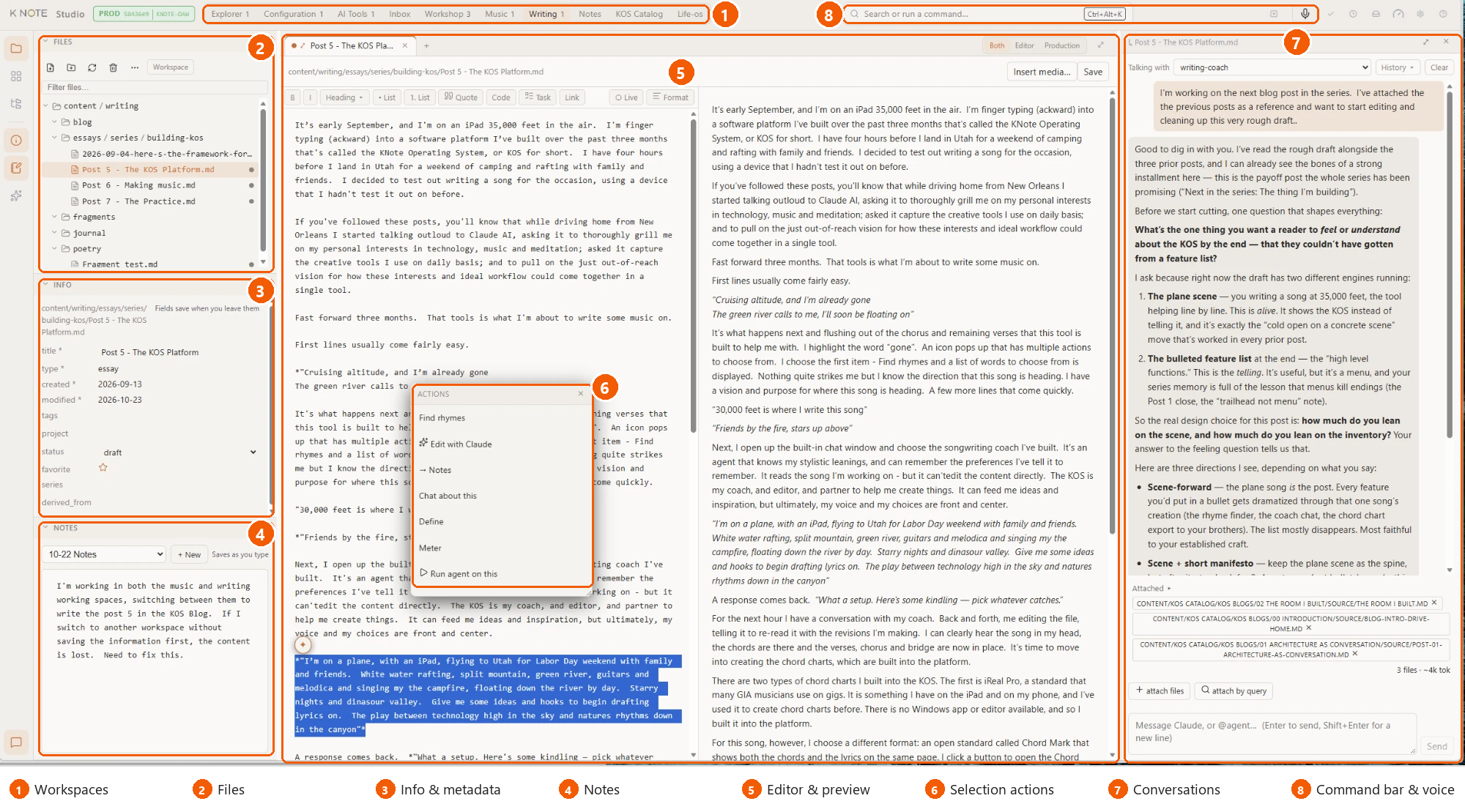
This picture is of me writing this very blog post. Navigating the room, from top to bottom and left to right.
1. Workspaces. Along the top, a set of workspaces I switch between — each one carrying its own tools and agents, tuned to the kind of content it’s for.
2. Files. On the left, the folders I’m working in, browsable and searchable as I move between pieces.
3. Info and metadata. Just beneath, the details that go along with each file — what it is, where it stands, how it’s tagged.
4. Notes. A quick notepad in the same panel for pulling threads together and parking ideas while I work across files.
5. Editor and preview. The center of the room, where I write and revise, and see it take shape. I can choose to see the draft, the finished page, or both side by side.
6. Selection actions. Highlight any passage and a menu opens right where my attention already is — find rhymes, tighten a line, ask a question about the selected text.
7. Conversations. Down the right-hand side, the coaches and agents I’ve built, attached to whatever file I’m working on.
8. Command bar and voice. Across the top, a single line for issuing commands, jumping to files, or recording a memo before the idea gets away.
The desk isn’t the only place the KOS is available. There’s a mobile version too — it’s the one I reach for in the morning and at night, capturing my daily progress or ideas that come when I’m in between things and on the go.
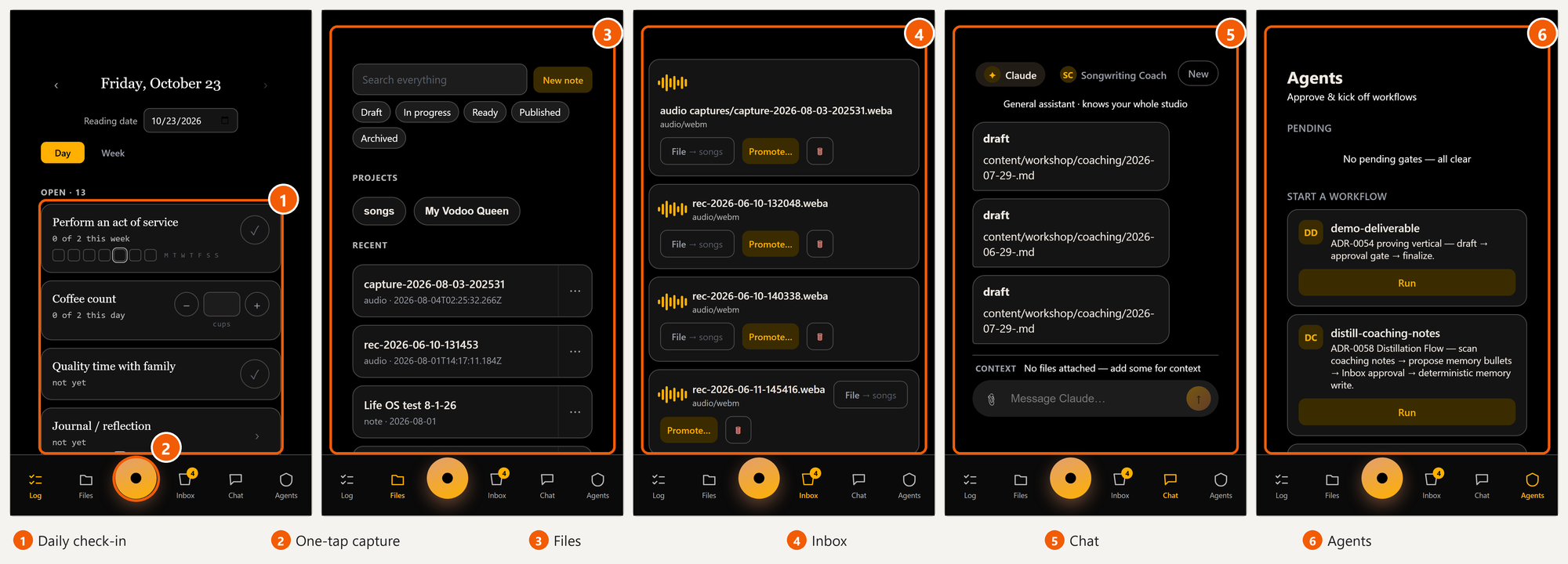
1. Daily check-in. A checklist of habits and practices I’m tracking, counted in ways that make sense to me: done or not yet, cups per day, times per week, or just a field I can speak into and have it translated to text. There’s a daily and weekly view, and I can go back to any earlier dates to fill in the gaps.
2. One-tap capture. The big button is always within reach for me to record a melody, capture a song fragment or an idea before it’s gone. Recordings land in the Inbox for me to pick up when I’m back on the computer.
3. Files. The same content I work on at my desk, searchable from the phone. Filter it by status (draft, in progress, ready, published), browse it by project, or start a new note and edit it directly on the phone.
4. Inbox. Where captures or agents park things until I decide where they should land: file one as a song, expand another, or turn a voice memo into text for the meditation workspace.
5. Chat. The same coaches I use at the desk, but now in my pocket: Claude, the Songwriting Coach or the Producer. I can attach one or more files so the coach knows the context of what I want to work on.
6. Agents. Start a multi-step task, such as a weekly digest of my briefings or turning an essay into a LinkedIn post, and approve the steps that need my sign-off before anything is finalized.
That’s the KOS — the tool I first pictured on the drive back from New Orleans, now built and sitting on my desk. Many of the ideas come from the various, disparate tools I’ve used in my previous workflow. And there are also specific capabilities I’ve built that no other platform has available (which I’ll discuss in future posts).
I’m still blown away that I could build something like this on my own, in such a short period of time, with no commercial team behind it. Just me, two computers, and a lot of conversations, leaning into a technology that is fascinating, frightening, and evolving at an unimaginable pace.
Somewhere over the Rocky Mountains, a song got finished and was whisked off at the speed of light — through satellites, cell towers and servers — saving to my computer in my loft in Brooklyn and landing on my brothers’ phones in time for the campfire. It feels like magic, creating something out of thin air and watching it travel. It just does.
By nightfall my brothers and I were singing it around a campfire. Singing with others in the dark of night is a very different rhythm, an ancient form of connection. And no amount of wizardry or artificial intelligence will replace the wonder and awe of looking up at the Milky Way and the shooting stars and the geological pressures that created the canyon that echoes our voices back to us.
Next in the series: Shoulda, Coulda, Woulda — a New Orleans-style performance that digs deeper into how the platform fits my creative flow, and how AI tools now let me do in an afternoon what once took months and thousands of dollars.